Generate a Flag Football Schedule Without Building It by Hand
Create your season, select the teams, and generate a structured round-robin schedule that accounts for your league’s fields and game time slots. Review the preview, regenerate it if needed, then confirm the schedule when it is ready.
No registration fees. Get 50% off your first season.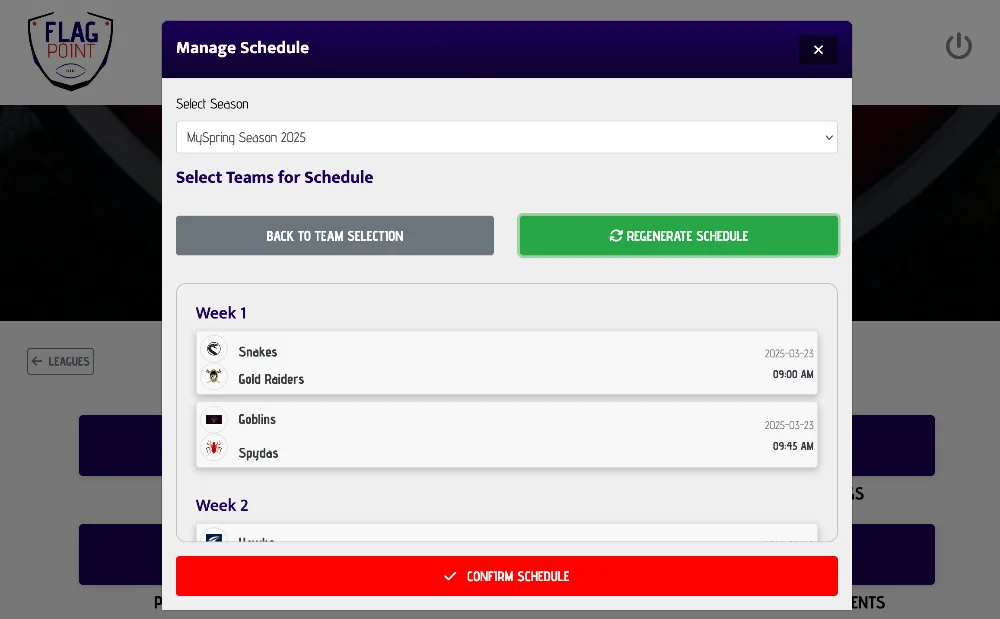
How do you generate a flag football schedule?
A flag football league schedule starts with the teams, season start date, available fields, and the amount of time reserved for each game. FlagPoint League Manager uses those settings to generate round-robin matchups and place games into weekly field and time slots, so organizers do not have to build every matchup manually.
What This Feature Helps You Do
Keep the work connected to the rest of the season instead of creating another standalone file or tool to maintain.
From Setup to Game Day
LeagueAssist keeps the next action clear while the feature stays connected to the league you are already managing.
Add your league settings
Set the primary location, number of fields, and game time slot when you create or edit the league.
Choose the season and teams
Open the schedule tool, select the season, and choose the teams that should be included.
Generate and confirm
Review the generated round-robin schedule. If it looks right, confirm it and begin running the season.
Round-Robin Scheduling Built for Flag Football Leagues
Round-robin scheduling is a practical fit for many weekly flag football leagues because every team can be rotated through a structured set of opponents. FlagPoint handles the matchup generation while keeping the schedule inside the same system as the rest of the season.
The generator also uses the field count and game time slot saved to the league. If multiple fields are available, games can be assigned across those fields at the same time before the next time slot begins.
This feature works alongside team management, scheduling, scores, standings, playoffs, and your public league page so the season stays in one connected workflow.
Schedule Generator FAQs
Common questions league organizers ask when planning and managing a flag football season.
How do you make a flag football schedule?
Start with the teams in the league, the season start date, the number of fields available, and the length of each game slot. A round-robin schedule then rotates teams through opponents over a series of weeks. FlagPoint automates that matchup and field assignment process.
How many games are in a round-robin flag football schedule?
For a single round robin, each team plays every other team once. The total number of games is n × (n - 1) ÷ 2, where n is the number of teams. For example, 8 teams create 28 total games.
What happens if a flag football league has an odd number of teams?
A round-robin schedule with an odd number of teams requires one team to sit out in each round. That is commonly handled as a bye while the remaining teams play.
Can a flag football schedule use multiple fields at the same time?
Yes. FlagPoint uses the number of fields saved to the league when laying out generated games, allowing multiple games to share the same time slot when enough fields are available.
Can I change the schedule before it is published?
FlagPoint lets you review the generated schedule and regenerate it before confirming. Once a schedule is confirmed, it becomes part of the season so scores, standings, and playoff data stay connected to a stable set of games.
Does the schedule connect to standings?
Yes. Once scheduled games are played and scores are entered, the same game data is used by League Manager for standings and the rest of the season workflow.
Related League Manager Features
Run More of Your Flag Football League From One Place
Start with the league you have today, then use LeagueAssist to move from setup to teams, schedules, scores, standings, playoffs, and game day.
Start Your League Today